
Introducing The New, Simplified MyCAP Advanced Profile
More precision when it matters. Less friction when it doesn’t.
Every college plan in MyCAP is only as accurate as the financial picture behind it. The more of your real situation the tool knows, the closer its numbers get to what each school will actually cost you, the Federal Student Aid Index (SAI), the Institutional SAI, the net price, and how much need-based or merit-based aid your student is likely to qualify for.
The challenge has always been asking for that extra detail without turning the profile into a wall of intimidating financial questions. Push for more accuracy and you risk overwhelming families before they’ve even started. Keep it simple and you leave accuracy on the table.
The redesigned advanced profile solves both at once. The deeper inputs that sharpen your results are now organized into clean, clearly labeled, optional sections, there when you want more precision, out of the way when you don’t. You’re never blocked from getting started, and you’re never forced to answer a question that doesn’t apply to your family.
What changed from the old advanced profile
The old design put the deeper inputs in a single Advanced Profile View, and everything appeared together, one dense block of additional financial fields, regardless of which ones were relevant to you. It worked, but it overwhelmed families.
The new advanced profile takes those same power-user inputs and gives them structure. Instead of surfacing every question at once, the extra detail now lives in labeled, expandable sections you open only when they apply:
- Parent Untaxed Income and other (Optional): pre-tax retirement contributions, HSA contributions, tax-exempt interest, untaxed pensions, veteran non-education benefits, child support received, IRA deductions, untaxed IRA distributions, living allowances, and other untaxed income.
- Student Financials: the student’s own income and assets, which financial aid formulas weigh differently from the parents’.
- Additional Scholarship Info: class size, class rank, and whether the student received a National Merit award, which help sharpen merit scholarship projections.
There’s a practical payoff, too: only the required fields count toward your profile completion percentage. The optional sections don’t, you can leave them blank and still reach 100%. That means full completion now takes far fewer questions than it used to, so you’re not stuck answering everything just to finish your profile.
Same accuracy under the hood; a much calmer surface. The point of the redesign isn’t more data for its own sake, it’s letting you decide, section by section, how precise you want your plan to be.
Why the extra detail matters
MyCAP builds its numbers on two aid formulas. The Federal SAI comes from the FAFSA formula and is used by every Title IV school. The Institutional SAI follows the CSS Profile-style methodology that the 200-plus private schools running their own need analysis rely on, and it looks at more than the basics, including things like home equity and additional asset types.
That’s exactly where the advanced sections earn their keep. Untaxed income, a student’s own savings, an untaxed pension, these are the inputs that move the Institutional SAI, and therefore the net price and need-based aid estimate at those schools. Skip them and your plan still works; fill in the ones that apply and the numbers get meaningfully closer to reality.
The design choice is deliberate: you get accuracy as an option you control, not a toll you pay up front.
How it works
The advanced sections live inside the Profile, alongside the tabs you already know, Account Info, Student Info, Custodial Parent & Household, and My College Budget. Here’s how a family works through them. The redesign also makes the two sections do two clearly different jobs.
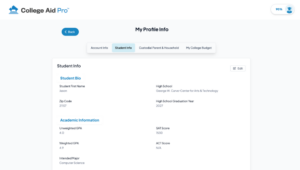
Student Info is about the student, academics and merit. Student Bio, Academic Information, and Additional Scholarship Info (GPA, test scores, class rank, National Merit) feed the merit side ie. the scholarships a school might offer based on how strong an applicant your student is.
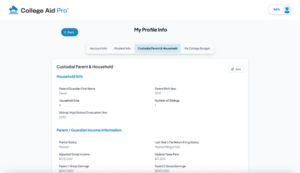
Custodial Parent & Household is about the family, income, assets, and household makeup. Those inputs drive the SAI calculations and the need-based side ie. how much need-based aid your student qualifies for and what each school actually costs you. Merit is earned on the student’s record; need is determined by the family’s finances, and now each lives in the section that matches it.
1
Start with Onboarding.
The onboarding questions alone are enough to calculate your basic SAI scores, the plan runs on those essentials, so you get results right away.
2
Fill in the parent and household details (Custodial Parent & Household tab). For a more accurate SAI, complete:
Household Info, Parent / Guardian Income Information, and Parent Assets, the core inputs.
Parent Untaxed Income and other (Optional), expand it and enter only the lines that apply to you; leave the rest blank.
Student Financials, the student’s own income and assets, which aid formulas weigh differently from the parents’.
3
Fill in the student details (Student Info tab):
Student Bio and Academic Information, the basics on your student.
Additional Scholarship Info, add class size, class rank, and National Merit status for sharper scholarship projections.
4
Save.
Your SAIs, net prices, and aid estimates refresh to reflect the fuller picture, and any field you left blank simply stays out of the calculation.


A family in practice: the Smiths
The Smiths were planning for their eldest son Jason, a high school junior, and instantly felt what most parents feel when they start planning for their first child: overwhelmed. The sticker prices looked impossible, the aid forms seemed like a wall of jargon, FAFSA, CSS Profile, SAI, and no one could tell them what any school would actually cost their family. All they wanted was the real number rather than a hopeful one, but nothing they tried gave it to them.
Then they found MyCAP, and it changed that in minutes. They answered the onboarding questions, got their first SAI scores and net-price estimates, and, for the first time, saw real costs instead of sticker shock. That alone was a relief.
Good enough to begin, but the Smiths knew their situation had a few wrinkles the basics didn’t capture: both parents contribute to pre-tax retirement accounts, and there’s a modest untaxed pension in the mix. So they finished the Household Info, Parent / Guardian Income Information, and Parent Assets sections, then expanded Parent Untaxed Income and other, added the two lines that applied to them, and left everything else blank. No wall of questions, no second-guessing.
Their son had also placed well in a competitive class, so on the Student Info tab they opened Additional Scholarship Info and entered his class rank and size. They skipped the Student Financials section entirely, he didn’t have meaningful income or assets yet, so there was nothing to add.
The payoff was a plan that reflected their family rather than a generic one. Their Institutional SAI and the net prices at the private schools on Jason’s list shifted to account for the extra information they shared. (Exact SAI scores depend on each family’s situation, these are the kinds of inputs that move the net cost.) The Smiths only ever touched the sections that applied to them, and they were never blocked from starting while they gathered the details. What started as overwhelming ended as a plan they actually trusted.
Why this matters
The best college plan is the accurate one, but accuracy shouldn’t cost families their patience or make them fill in fields that don’t apply. The redesigned advanced profile lets you dial in exactly as much precision as your situation calls for: start simple, then open the optional sections that fit, one at a time. More signal, less noise, and a plan that gets sharper the more of your real picture you choose to share.
Try it
Already have a plan in MyCAP? Open your Profile and explore the optional advanced sections, add the ones that apply and watch your numbers sharpen. New here? Start your free plan, get your first results in minutes, and layer in the detail whenever you’re ready.
More Precision When It Matters, Less Friction When It Doesn’t
Open your MyCAP Profile and explore the optional advanced sections at your own pace.
SAI estimates and net price figures are based on the information you provide in your MyCAP profile and are subject to each school’s final financial aid determination. Information current as of 2026 and subject to change.